Save as many bookmarks as you need
All users, including those on the free Deckhand plan, can save unlimited bookmarks.
Save the page you are on
Navigate to the page you want to save, select the Caves of Wonders (CoW) toolbar button, and choose Stash For Later. The popup guides you through choosing where the bookmark should go. 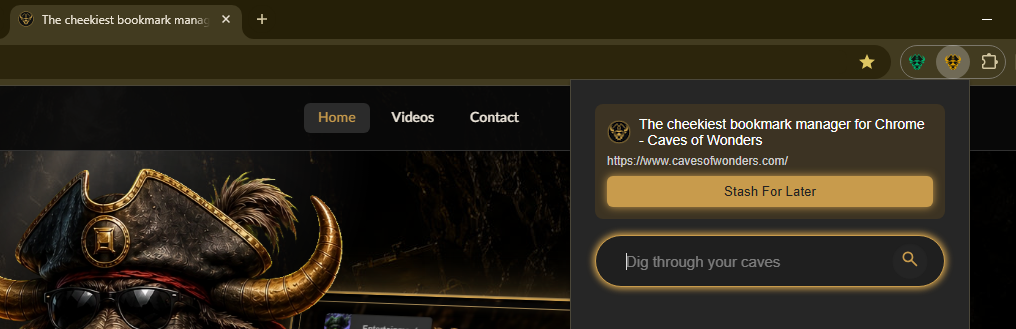
Use bookmark tools in every layout
In compact-list layout, select Show Toolbar to display the bookmark options. 
In icon layout, hover over a bookmark to display its action menu. 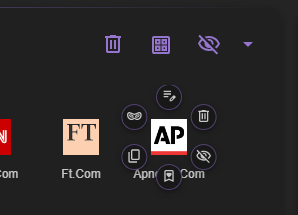
In list layout, the action buttons appear to the right of each bookmark. 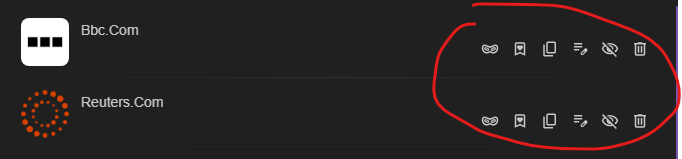
Open, edit, and manage bookmarks
Select a bookmark icon to open it. You can also edit or delete a bookmark whenever you need to.
Captain and Fleet users can change a bookmark’s favicon, including using a GIF. 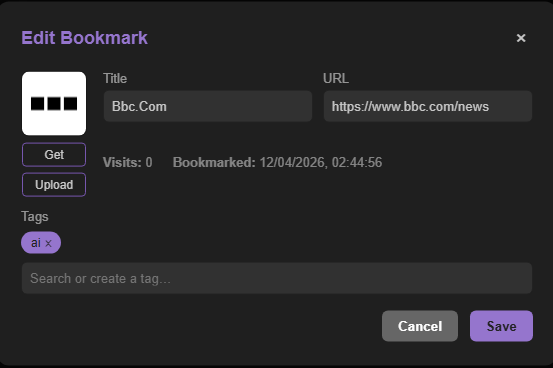
By default, Caves of Wonders (CoW) uses the favicon provided by the website when one is available.
Favorites and private browsing
Use the Favorite button to mark a bookmark as a favorite. Favorites appear on the Dashboard, where you can add them to Speed Dial.
Open any bookmark in incognito or private mode by selecting Open Privately. You can also use Ctrl + Click, or Command + Click on Mac.
Hide and reorganize bookmarks
When you hide a bookmark, it is removed from search results and from Speed Dial if it was assigned there.
Drag and drop bookmarks to change their order or move them into a different Chest.